Fast Food King is a fast-paced simulation and time management game developed and published by HAMSI Interactive, released on January 23, 2026. In Fast Food King, players manage a busy street food stand, preparing and serving hot dogs, hamburgers, drinks, and other fast food items to hungry customers while racing against the clock. The game blends casual simulation with immersive time-management mechanics that challenge both reflexes and strategic planning. Fast Food King supports single-player gameplay and features adjustable difficulty, allowing players to enjoy short bursts of play or longer gaming sessions.
On platforms like Steam, Fast Food King is categorized under simulation, casual, and time management genres, making it appealing to players who enjoy managing food service environments and optimizing order fulfillment under pressure.
Why Buy Fast Food King on PL2W?
PL2W is a digital game marketplace where users can buy games at discounted prices and receive instant digital delivery. The platform offers a simplified checkout experience and access to purchased games or activation keys shortly after payment. Reviews from independent sources indicate that PL2W has an average to good trust score and receives significant user traffic, and many customers report positive purchase experiences.
Before proceeding, always ensure that you understand how the delivery method works on PL2W and that you are comfortable with the purchase terms.
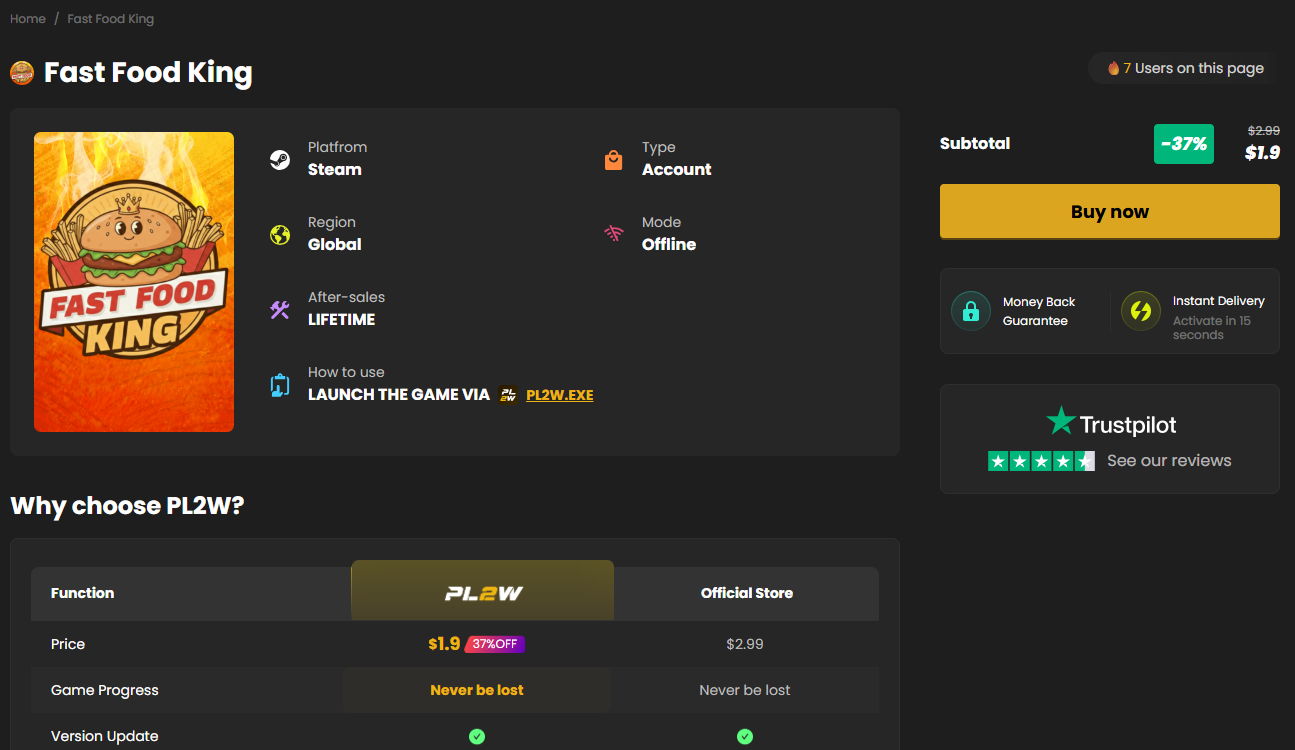
How to Buy Fast Food King on PL2W – Step by Step
Step 1: Open the Fast Food King Product Page
Access the Fast Food King page on PL2W by navigating through the site’s game library or searching for “Fast Food King” on PL2W. The product listing will show a price, the game title, genres, and basic details such as platform compatibility (e.g., Windows).
Step 2: Review the Game Details
Before you buy Fast Food King, check the following on the PL2W product page:
Game title and platform compatibility
Price and any available discounts
Delivery method (game activation key or digital access)
This helps ensure that the game meets your expectations and works on your system.
Step 3: Add Fast Food King to Your Cart
Once you are on the Fast Food King product page, click the Buy Now or Add to Cart button. This adds the game to your shopping cart and prepares it for checkout. Confirm the correct version if multiple options are present.
Step 4: Sign In or Register an Account
To complete the purchase, you must be signed in to a PL2W account. If you already have one, log in using your email and password. If not, register a new account with a valid email. Having an account allows you to track your orders and access your purchase history.
Step 5: Complete the Payment
Proceed to the checkout page and select your preferred payment method. Review your order summary carefully to confirm the game title “Fast Food King” and final price before completing the payment. Follow the on-screen instructions to finalize the transaction.
Step 6: Receive Your Digital Game Access
After successful payment, your purchase will be processed. Depending on the delivery type, you may receive:
A digital activation key displayed on screen and sent to your email, or
Direct game access added to your PL2W library.
Keep the activation key or download information in a safe place.
Step 7: Activate and Play Fast Food King
If you receive a Steam activation key:
Open your Steam client
Go to Games > Activate a Product on Steam
Enter the Fast Food King activation key
Download and install the game
Once installed, you can launch and play Fast Food King through Steam.
If your PL2W purchase delivers direct access without a separate key, follow PL2W’s instructions to install and launch the game from the platform’s interface.