When you buy several games on PL2W, the hidden cost is often not just the product price. Card fees, FX spreads and repeated 3D Secure checks can stack up at checkout. P-Coin is a smarter prepaid option: lock in a top-up discount once, then deduct the balance on later orders.
What is P-Coin?
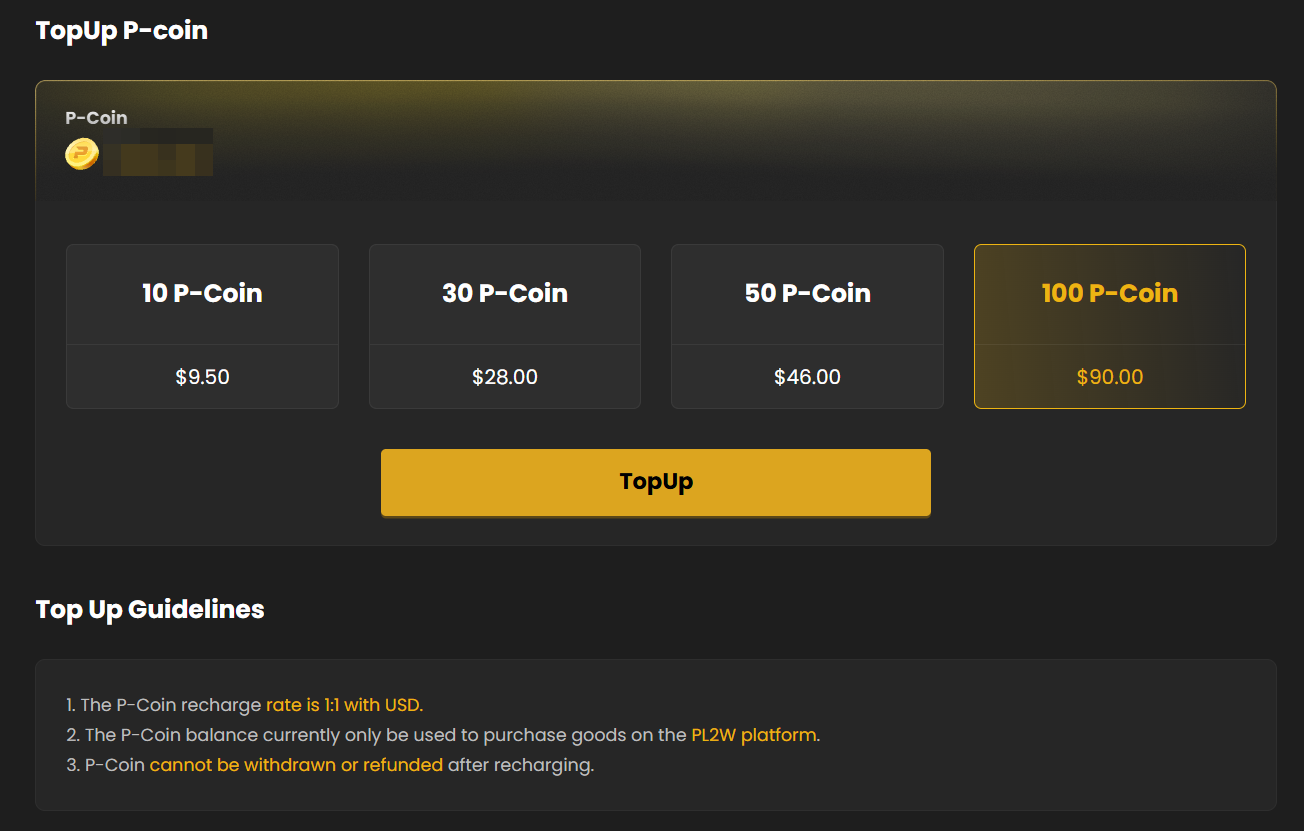
P-Coin is PL2W’s prepaid platform balance. You can apply it directly to product totals at checkout. Face value is 1 P-Coin = US$1, while top-up packs themselves are discounted by 5%–10%. Charge once, then spend it across multiple purchases.
How much can the four top-up tiers save?
On PL2W, P-Coin spends at 1 P-Coin = US$1, but buying a pack costs less than face value. Higher tiers unlock clearer discounts.
Using the same Skrill channel, the P-Coin top-up still carries a fee. The top-up discount is what still cuts about US$4.30 off this order.
TOP UP & SAVE
Planning purchases soon? Pick a tier by total spend
Add up the games you plan to buy first, then choose the closest top-up amount.
View P-Coin top-up tiersIf you buy games on PL2W regularly, what does P-Coin change?
1. You get 5%–10% off at top-up
On the 100 P-Coin tier, you pay US$90 for US$100 of spendable balance. Use it all later and that pack alone saves US$10.
2. Fewer repeated third-party payments
If your Visa, credit card or other method charges per transaction—or forces a fresh verification every time—one top-up split across later orders can reduce those repeats. Channel or FX fees on the top-up itself still depend on the payment method you choose.
3. You do not need to spend the whole balance at once
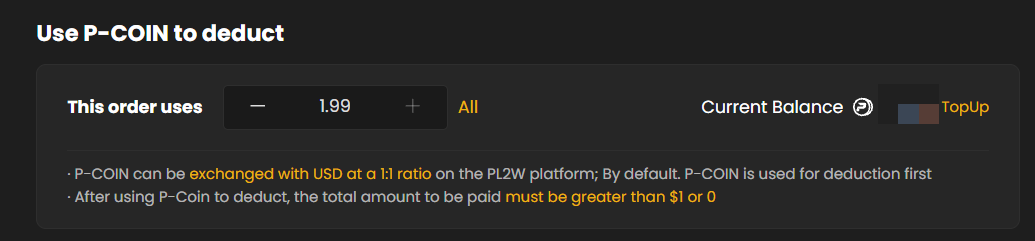
P-Coin can be applied order by order. Buy one game today and leave the rest for later. At checkout you can use only part of the balance, or tap All for full deduction.
4. It is easier to set a game budget
Convert your near-term game budget into a fixed balance first, then decide whether to keep buying based on what is left. That is usually clearer than paying ad hoc every time.
Where do you top up? Two steps
After signing in to PL2W, open the avatar menu in the top-right corner and choose P-Coin.
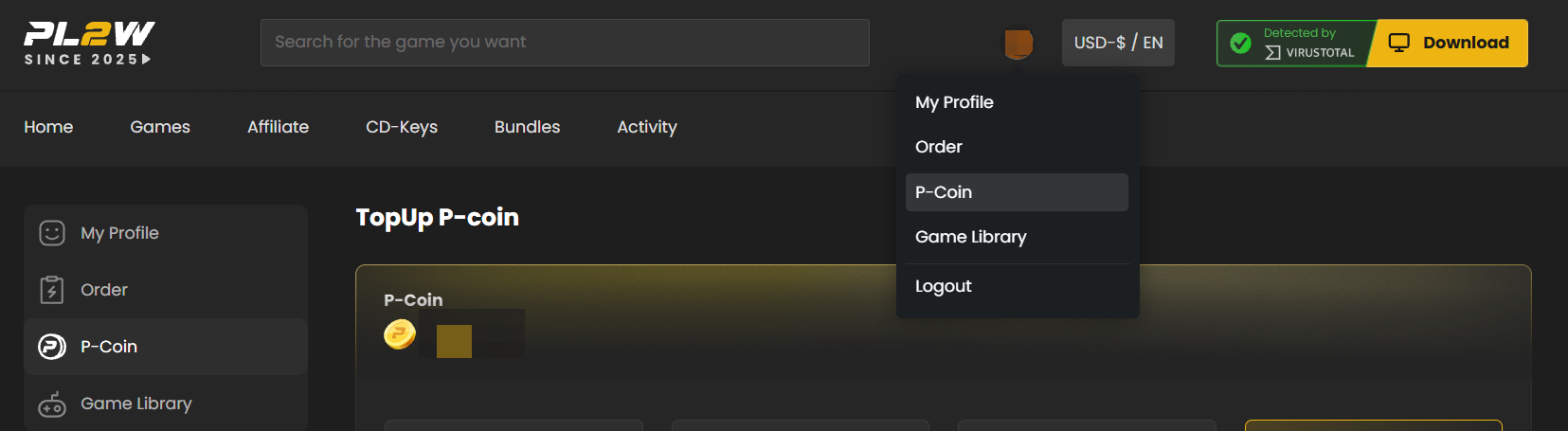
On the page, pick 10, 30, 50 or 100 P-Coin, then hit TopUp. Before choosing a tier, add up the products you plan to buy soon so you do not overcharge just for a higher discount.
How does checkout deduction work?
Checkout shows Use P-COIN to deduct. Use the plus and minus controls to set the amount for this order, or choose All. P-Coin is applied first; any remaining total is paid with another method.
Three rules to know before topping up
FAQ
How many dollars is 1 P-Coin worth?
On PL2W, P-Coin has a 1:1 face value with USD. Top-up packs are discounted, so 100 P-Coin costs US$90.
Can I use only part of my P-Coin on an order?
Yes. At checkout you can adjust the amount or apply everything. Any remaining payable total must be above US$1 or exactly 0.
Does P-Coin remove all credit-card or payment fees?
No guarantee. It can reduce how often you call a third-party payment method, but fees or FX on the top-up itself still depend on the channel you use.
Can I refund or withdraw P-Coin after topping up?
No. Once topped up, the balance cannot be refunded or withdrawn, so pick a tier based on real purchase plans.
Can I use P-Coin outside PL2W?
No. The balance currently works only for products sold on PL2W.
Which tier should I start with?
Try 10 P-Coin if you just want a first test. If several games are already on your list, choose 30, 50 or 100 based on expected spend. Do not overcharge just for a bigger headline discount.
Count what you will buy first, then decide how much to top up
Discounts only count when the balance gets used. Regular buyers also gain more from fewer repeated payment steps.
Sign in to PL2W and open P-Coin